
Ergonomic Advice for Canary Wharf Professionals
In the high-pressure environment of Canary Wharf, many professionals spend 8 to 12 hours a day working at desks — often in positions that silently damage their spine. Prolonged sitting, poorly adjusted chairs, incorrect monitor heights, and repetitive keyboard use all contribute to workstation-induced musculoskeletal stress. Without a properly aligned ergonomic setup, the risk of neck pain, lower back pain, and postural dysfunction increases significantly.
At Freedom Clinics, our team of experienced chiropractors provides clinical-grade ergonomic consultations tailored for office-based professionals. We combine biomechanical screening, posture assessment, and workstation evaluation to identify how your daily habits affect your spinal alignment, movement mechanics, and long-term MSK resilience.
Book your appointmentMedically reviewed by Tanesa Mohan (MChiro LRCC). Last update: 29 January 2026.
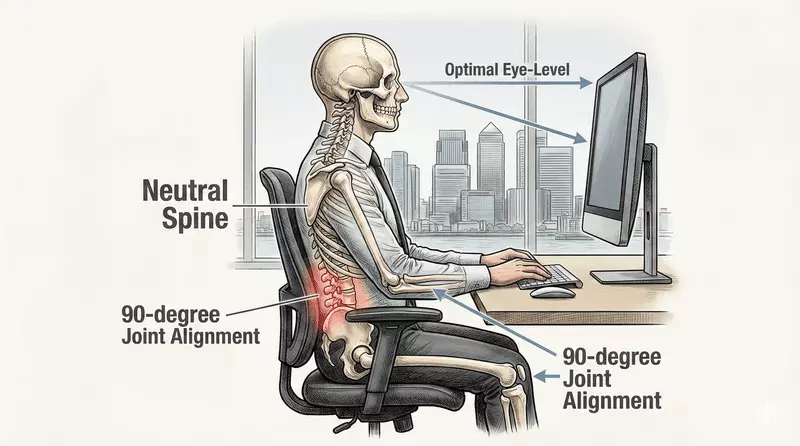
By applying the science of ergonomics through a chiropractic lens, we help patients correct postural loading imbalances, reduce chronic strain, and enhance neuromuscular efficiency at work. Whether you’re dealing with tech neck, rounded shoulders, or desk-related fatigue, we deliver personalised solutions that support both spinal health and professional performance.
Ergonomics isn’t optional — it’s essential. When guided by chiropractic insights, it becomes one of the most effective interventions for sustaining productivity, reducing physical fatigue, and preventing work-induced injuries.
Understanding Ergonomics: A Chiropractic Guide to Spinal Health and Postural Load
How Chiropractors Use Ergonomics to Improve Posture and Spinal Mechanics
Clinical ergonomics, when applied through a chiropractic lens, is the systematic design of work environments to align with the body’s anatomical and functional structures. Chiropractors focus on how ergonomics directly affects spinal neutrality, postural control, and neuromuscular efficiency.
At Freedom Clinics, we evaluate the cumulative impact of workstation habits — like monitor height, keyboard reach, and chair depth — on the cervical, thoracic, and lumbar regions of the spine. This functional analysis helps us identify the root causes of postural deviation, fatigue, and mechanical stress that contribute to musculoskeletal dysfunction.
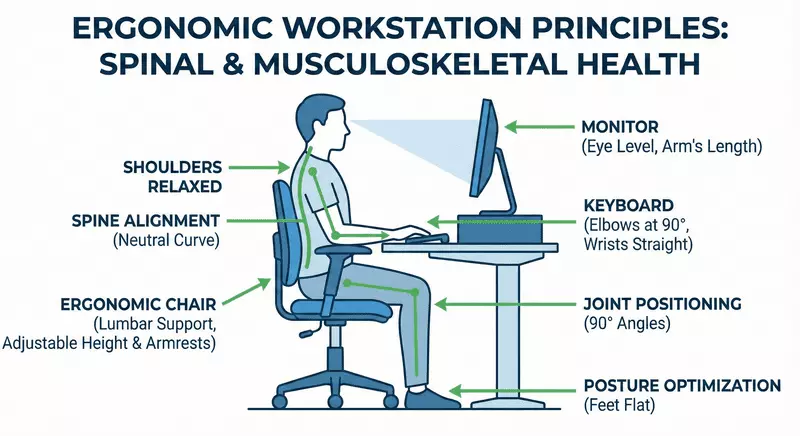
The Biomechanical Impact of Poor Ergonomics on Spine and Joints
When workstation components fall outside ergonomic parameters, the resulting misalignments place abnormal force loads on spinal joints and soft tissues. Common patterns include:
- Forward head posture caused by screens placed below eye level
- Thoracic collapse from unsupported sitting or low back rounding
- Shoulder internal rotation due to narrow keyboard or mouse placement
These maladaptations alter postural loading zones, leading to increased disc compression, facet joint stress, and higher risk of repetitive strain injuries (RSIs). Left uncorrected, they contribute to chronic pain conditions that can severely limit spinal mobility and function.
Research from the Department of Rehabilitation Sciences at the University of Queensland demonstrated that sustained non-neutral seated postures significantly increase spinal disc compression and facet joint loading, while simultaneously elevating mechanical stress in surrounding soft tissues, creating conditions strongly associated with repetitive strain injuries during prolonged desk work.
Preventing Chronic MSK Pain Through Ergonomic Spinal Load Management
Spinal load distribution is central to musculoskeletal health. Poor ergonomic setups concentrate force onto specific spinal segments, accelerating MSK wear and degeneration over time. This results in:
- Decreased movement variability
- Increased spinal rigidity
- Long-term tissue adaptation that often requires manual correction
According to longitudinal occupational health research conducted by the Finnish Institute of Occupational Health, uneven spinal load distribution during sedentary work accelerates musculoskeletal tissue fatigue and degenerative adaptation, particularly in the cervical and lumbar regions, increasing long-term risk of chronic musculoskeletal disorders among office-based workers.
In contrast, chiropractic-led ergonomic interventions aim to evenly distribute biomechanical load across joint systems, maintain postural integrity, and reduce the neuromuscular stress that accumulates during prolonged desk work. This not only prevents injury but also enhances spinal adaptability and resilience — critical for professionals with high daily sedentary loads.
Our Chiropractic-Led Ergonomic Consultation: Spinal Assessment, Workstation Correction, and Load Management
At Freedom Clinics, our chiropractic ergonomic consultations are built on advanced clinical frameworks that connect your workstation setup to real-world spinal outcomes. Far from generic advice, each session is led by a licensed chiropractor and focuses on the structural, functional, and behavioral contributors to postural misalignment, musculoskeletal strain, and spinal loading asymmetry.
During the ergonomic assessment, we perform:
- Digital posture mapping of the cervical, thoracic, and lumbar regions
- Functional movement screening to evaluate compensatory patterns in seated and transitional positions
- Workstation behavior audits to pinpoint ergonomic risk factors tied to repetitive strain injuries (RSIs) and cumulative fatigue
Each test is calibrated to detect early signs of kinetic dysfunction that may evolve into chronic spinal conditions or workplace-related MSK disorders.

How We Reconfigure Workstation Ergonomics to Restore Alignment and Reduce Musculoskeletal Risk
Once the clinical picture is clear, we design personalised ergonomic correction strategies that align with both your physical needs and daily routine. Our recommendations are evidence-based and highly specific, often involving:
- Chair height and lumbar support modifications to restore pelvic neutrality and reduce lumbar disc pressure
- Monitor positioning to correct forward head posture and balance cervical spine mechanics
- Keyboard and mouse realignment to maintain wrist neutrality and minimise upper limb tension
- Use of ergonomic tools such as footrests, laptop risers, or sit-stand desks to enhance dynamic support
The goal is not just comfort, but sustainable biomechanical efficiency — ensuring that every hour spent at your desk reinforces, rather than undermines, your postural stability and spinal health.
Your Ergonomic Session: Step-by-Step Guide to Chiropractic Review and Corrective Advice
A typical ergonomic consultation lasts between 30 and 45 minutes and includes:
- Chiropractic-led ergonomic screening
- Targeted analysis of your workstation setup and posture habits
- Demonstration of ergonomic correction techniques tailored to your needs
- A written or digital summary with actionable changes
- Optional referral for manual therapy or ongoing posture rehabilitation, if required
This integrated session provides immediate relief and long-term strategy — ensuring your desk no longer becomes a source of chronic back or neck pain, but a support system for healthy MSK function.
Chiropractor-Approved Ergonomic Setup Guide: Spinal Alignment, Postural Support, and Workstation Optimisation
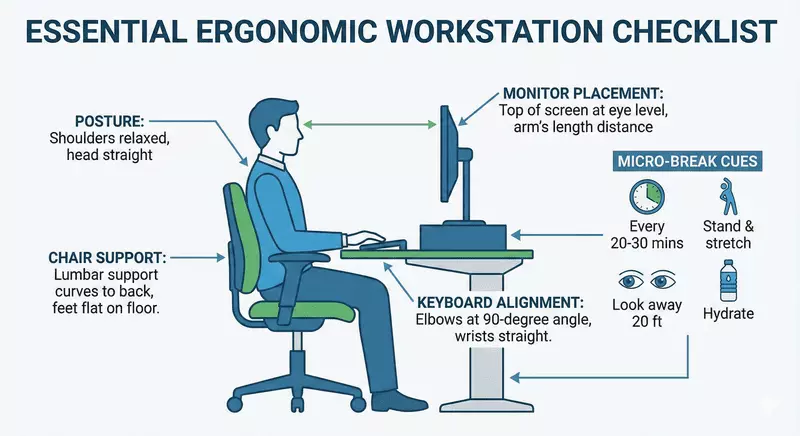
An effective ergonomic workstation protects the spine, maintains postural symmetry, and reduces cumulative biomechanical stress across the cervical, thoracic, and lumbar regions. Below is a comprehensive, chiropractor-approved checklist designed to reduce spinal loading, improve sitting posture, and prevent sedentary strain.
Postural Ergonomics
- Lumbar support: Chair should provide dynamic lumbar cushioning to maintain spinal curvature and prevent disc compression
- Pelvic positioning: Seat height should ensure hips are slightly above knees, promoting pelvic neutrality
- Kinetic chain stabilisation: Feet must rest flat on the floor or footrest to distribute lower body load evenly
- Weight distribution: Thighs remain parallel to the floor without seat edge compression under hamstrings
- Back engagement: Sit back fully into the chair to support the thoracolumbar junction and prevent slumping
Visual Ergonomics
- Cervical alignment: Monitor height positioned so top of screen is at or just below eye level
- Visual distance: Screens set at arm’s length (~50–70 cm) to prevent forward head posture
- Dual monitor symmetry: Ensure visual axis aligns centrally or ergonomically favours dominant screen
- Light harmonisation: Monitor brightness adjusted relative to room lighting; glare minimised by perpendicular positioning to windows
Repetitive Motion Ergonomics
- Wrist neutrality: Keyboard and mouse must maintain straight wrist positioning to prevent repetitive strain injuries (RSIs)
- Elbow angles: Forearms parallel to floor, elbows bent at ~90°, shoulders relaxed
- Reach zone control: Mouse located close to keyboard to avoid shoulder abduction or trunk rotation
- Support surfaces: Use wrist rests or supportive pads for prolonged typing sessions
Chiropractor Tips to Maintain Posture and Prevent Sedentary Stress Injuries
- Micro-breaks every 30 minutes: Stand up, rotate your neck, stretch the thoracic spine
- Quarterly workstation audit: Reassess your setup based on new equipment or work patterns
- Dynamic movement strategies: Consider sit-stand desks or foot engagement boards for variation
- Pain is a signal: Repetitive discomfort is often a sign of ergonomic failure or spinal compensation
Chiropractic-Endorsed Movement & Micro-Break Strategies: Spinal Decompression, Postural Reset, and Musculoskeletal Load Management
Even with an ergonomically optimised workstation, prolonged sitting generates sedentary load, compressing spinal discs, fatiguing postural muscles, and limiting joint mobility.
A controlled investigation led by the School of Human Movement Sciences at the University of Western Australia found that prolonged uninterrupted sitting increases spinal disc compression while reducing paraspinal muscle oxygenation and joint mobility, effects that persist even in ergonomically optimised workstations unless regular movement breaks are introduced.
Chiropractic insights highlight that cumulative static positions increase musculoskeletal stress, which can lead to chronic back pain, neck strain, and postural deterioration.
Integrating micro-breaks and movement strategies into your workday promotes spinal decompression, enhances neuromuscular activation, and maintains postural integrity, reducing the risk of long-term musculoskeletal dysfunction.
To understand how these movement principles fit into a wider plan of care, explore our chiropractic care guide.
Postural Reset Movements to Reduce Cervical and Thoracic Load
- Cervical retraction (chin tucks): Realigns the head over the cervical spine and reduces forward head strain
- Scapular retraction: Activates thoracic muscles to counteract shoulder rounding from prolonged desk work
- Thoracic extension over chair back: Decompresses the upper spine and improves spinal curvature

Dynamic Spinal Mobility Techniques to Mitigate Sedentary Stress
- Standing lumbar extensions: Relieve lumbar disc compression and enhance lower back flexibility
- Hip flexor stretches and activation: Opens anterior chain, supporting pelvic neutrality
- Wall angels / shoulder circles: Maintain scapulothoracic rhythm and reduce shoulder tension
Full-Body Micro-Movements for Neuromuscular Activation
- Walk for 2–3 minutes to restore circulation and reduce sedentary spinal load
- Look away from screens to relax ocular muscles and maintain cervical alignment
- Perform 10–15 calf raises or squats to stimulate the posterior kinetic chain and postural musculature
Scheduling Chiropractic-Recommended Micro-Breaks to Minimise Spinal Compression
| Activity Trigger | Recommended Micro-Movement |
|---|---|
| After finishing a meeting | Walk 2–3 minutes + shoulder retraction sequence |
| Each time you refill water | Perform 10 squats or ankle pumps |
| Before lunch | Thoracic extension sequence over chair |
| During long calls | Stand, pace, or perform gentle spinal rotations |
Even brief, frequent movements prevent accumulation of sedentary load, improve neuromuscular control, and maintain spinal hydration.
If sitting-heavy work is already aggravating symptoms, our guide to desk-related back pain explains the patterns we commonly see and how to address them.
Ergonomic Tools and Devices to Support Movement and Postural Health
- Sit-stand desks: Promote postural variation and reduce static spinal load
- Under-desk wobble boards or pedal devices: Encourage micro-movements for joints and muscles
- Movement reminder apps: Ensure consistency in micro-break intervals and promote adherence to chiropractic-recommended schedules
Chiropractic-Guided Ergonomics for Home and Remote Work: Spinal Alignment, Postural Health, and Biomechanical Load Management
Remote work often involves improvised workstations — laptops on couches, kitchen tables, or beds — which increase biomechanical load and lead to postural strain. Even brief daily sessions without proper setup can accelerate musculoskeletal dysfunction in the cervical, thoracic, and lumbar regions.
A large-scale occupational analysis by the National Institute for Occupational Safety and Health (NIOSH) reported that improvised home workstations significantly increase biomechanical loading and postural strain in the cervical and thoracolumbar spine, particularly when laptops are used without external peripherals or height adjustment.
At Freedom Clinics, our chiropractors provide home workspace ergonomic consultations to ensure that your setup preserves spinal alignment, maintains postural stability, and prevents repetitive strain injuries (RSIs), maintaining optimal musculoskeletal performance.
When discomfort keeps returning despite small setup tweaks, a clinical posture assessment can pinpoint the specific loading pattern driving it.
Seating and Lumbar Support to Maintain Spinal Alignment at Home
- Use a chair with adjustable lumbar support to maintain natural spinal curvature
- Seat height should allow feet to rest flat on the floor or footrest for pelvic neutrality
- Avoid slouched or reclined positions that increase thoracic load and compromise spinal health
- Sit fully back in the chair to engage thoracolumbar support and reduce spinal stress
Monitor and Desk Setup to Prevent Forward Head and Thoracic Strain
- Position your monitor at eye level to preserve cervical neutrality and prevent forward head posture
- Maintain an arm’s length distance from screens to minimise cervical strain
- Align dual monitors to reduce rotational spinal stress
- Adjust brightness and contrast to limit visual fatigue while maintaining proper spinal posture
If screen height and viewing distance still leave you ‘craning’ forward, our page on forward-head posture and neck pain breaks down why this happens and what typically helps.
Peripheral Ergonomics: Reducing Musculoskeletal Load and Repetitive Strain Injuries
- Keep keyboard and mouse within comfortable reach to prevent shoulder and torso twisting
- Maintain neutral wrist posture and 90° elbow flexion during typing
- Use wrist rests or supportive pads for prolonged sessions to reduce cumulative musculoskeletal load
Home-Based Micro-Breaks and Postural Reset Strategies
- Stand or walk for 2–3 minutes every 30–45 minutes to promote spinal decompression and neuromuscular activation
- Perform postural reset exercises: shoulder rolls, thoracic extensions, neck retractions
- Stretch hip flexors and posterior chain muscles to mitigate sedentary load and prevent MSK strain
Ergonomic Tools and Devices for Optimal Posture and Biomechanical Load Management
- Adjustable sit-stand desks to alternate between seated and standing positions
- External keyboards and laptop risers to improve visual and postural ergonomics
- Footrests, supportive cushions, and monitor arms to maintain neutral spinal alignment
- Movement reminder apps to enforce micro-breaks and maintain neuromuscular activation
For a deeper explanation of how sustained sitting pressure affects tolerance over time, see our guide to spinal disc load management.
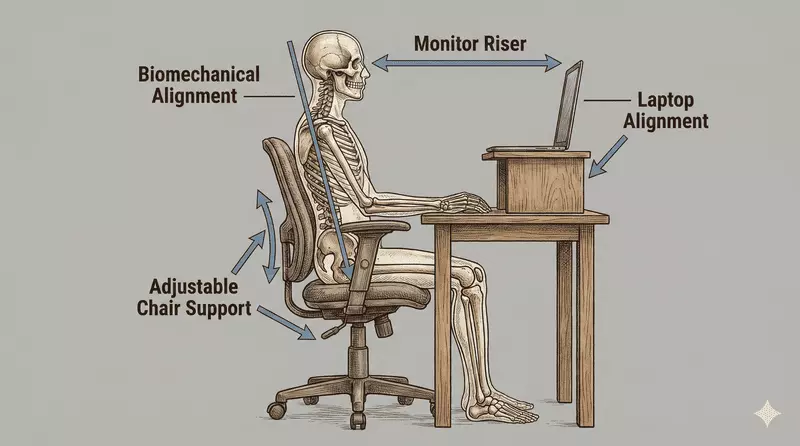
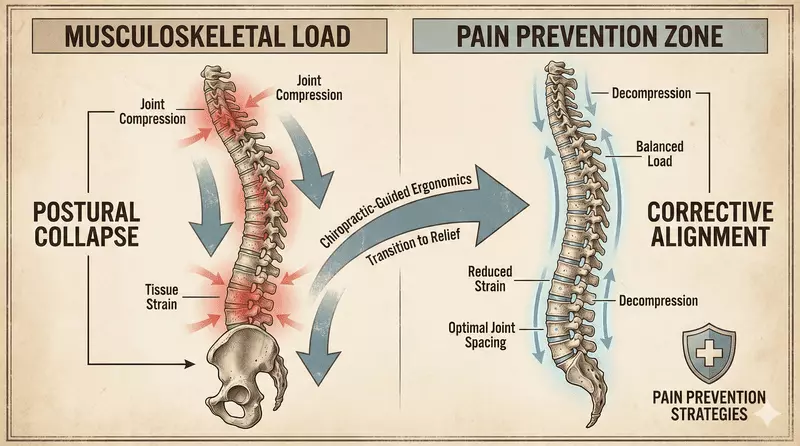
Chiropractic Ergonomics for Pain Prevention: Integrating Spinal Alignment, Postural Health, and Musculoskeletal Load Management
Prolonged sitting and suboptimal workstations increase musculoskeletal (MSK) load, leading to neck pain, back strain, and repetitive stress injuries (RSIs). Proper ergonomic intervention combined with chiropractic guidance maintains spinal alignment, supports postural health, and prevents chronic pain.
At Freedom Clinics, chiropractors integrate clinical ergonomic assessments with personalised strategies to reduce biomechanical stress, improve neuromuscular efficiency, and preserve long-term musculoskeletal function.
Chiropractic Interventions to Minimise Spinal and Musculoskeletal Load
- Spinal Load Evaluation: Assess cervical, thoracic, and lumbar loading patterns to identify high-risk postures
- Corrective Posture Interventions: Implement postural resets, adjust lumbar support, and optimise monitor positioning to maintain neutral spine alignment
- Movement Integration: Prescribe micro-breaks, stretches, and mobility exercises to reduce cumulative sedentary load and prevent overuse injuries
Monitoring, Early Detection, and Clinical Integration for Postural Health
- Symptom Tracking: Early detection of neck, shoulder, and back discomfort triggers ergonomic review and chiropractic intervention
- Workstation Audits: Periodic reassessment ensures ongoing spinal alignment and postural health as tasks and environments change
- Integrated Clinical Approach: Ergonomic recommendations are combined with hands-on chiropractic adjustments, when needed, for optimal MSK protection
Evidence-Based Ergonomic Practices to Prevent Neck, Back, and Shoulder Pain
- Maintain lumbar support and pelvic neutrality during seated work
- Adjust monitor height to prevent forward head posture
- Incorporate micro-breaks and dynamic stretches to reduce thoracic and lumbar stress
- Follow a chiropractic-guided ergonomic plan tailored to your work environment and occupational tasks
If tension is clustering around the upper back and shoulder girdle, our resource on desk-related shoulder pain can help you match the right adjustments and exercises to the pattern.

Our Chiropractors


References
- Bullock-saxton, J. (1988). Normal and abnormal postures in the sagittal plane and their relationship to low back pain. Physiotherapy Practice, 4(2), 94–104. https://doi.org/10.3109/09593988809159056
- Kaila-Kangas, L., Keskimäki, I., Notkola, V., Mutanen, P., Riihimäki, H., & Leino-Arjas, P. (2006). How consistently distributed are the socioeconomic differences in severe back morbidity by age and gender? A population based study of hospitalisation among Finnish employees. Occupational and environmental medicine, 63(4), 278–282. https://doi.org/10.1136/oem.2005.021642
- Beach, T. A. C., Parkinson, R. J., Stothart, J. P., & Callaghan, J. P. (2005). Effects of prolonged sitting on the passive flexion stiffness of the in vivo lumbar spine. Spine Journal, 5(2), 145–154. https://www.nw-sc.co.uk/wp-content/uploads/2010/10/Effects-of-prolonged-sitting-on-the-passive-flexion-stiffness.pdf
- van Vledder, N., & Louw, Q. (2015). The effect of a workstation chair and computer screen height adjustment on neck and upper back musculoskeletal pain and sitting comfort in office workers. The South African journal of physiotherapy, 71(1), 279. https://doi.org/10.4102/sajp.v71i1.279

